Tags: Customers, register, catalog
Lesson ID-104.1
Updated to:
26/11/2025
Lesson objective
The user should be aware of the customer registration within the system in order to begin creating the customer catalog.
Create a customer
To begin issuing e-documents, it is essential to first register the recipients (customers).
It is important to note that the information required by the SAT (Mexican Tax Administration Service) for issuing or receiving tax documents includes the name (including business name or corporate name), tax address, and Federal Taxpayer Registry (RFC) number.
To perform this action, you must first log into the system as indicated in lesson ID-101.1
Next, go to the "Customers" module to begin the registration process.
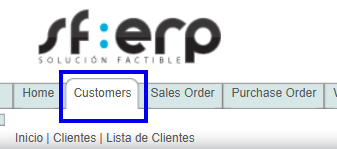
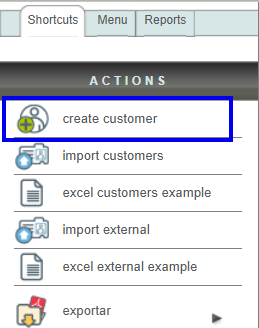
Once inside the module, go to the "Actions" menu and click on the "Create customer" option.
Mandatory data: RFC y Customer name (tax name or company name), the rest of the data requested in this section is for informational purposes and only helps you to maintain more information about your customer; however, it is not printed on your e-documents.
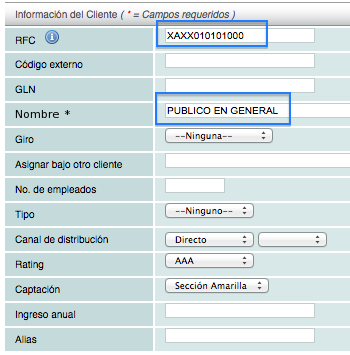
Note: Verify the customer's RFC (Taxpayer Identification Number) information. Our system validates that this information complies with official standards. For more information, see the RFC structure.
Requested data: "Alias" (title of the entered address, this helps identify the different branches your client may have), calle and número, país, estado, ciudad, C.P, etc. The cities, regions, and municipalities are pre-loaded into the system according to the list published by INEGI.
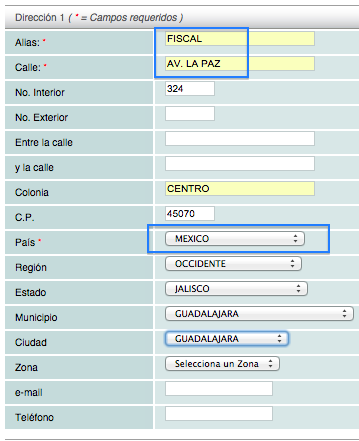
Note: The "Dirección 1" must be the tax of your customer and as "Alias" you must put the data "FISCAL".
Click on lesson ID-103.2 to create an e-document.
